
Online Tutoring Boundaries for Test-Prep Tutors
In last week’s post, Tutor Social Media Policy: Keep It Clean, Private & Professional, I focused on social media boundaries for tutors—how to keep your online presence clean, private, and professional so social media never compromises the tutoring relationship.
This post is the online tutoring version of the same idea.
Online tutoring, by design, can feel a bit more relaxed and casual because you’re not sharing a space. But the reality is the opposite: you’re virtually entering a student’s home. That’s why it’s important to treat online sessions just like in-home sessions—establish clear setup expectations, clear privacy rules, and have a few simple scripts ready for handling any boundary issues—so your tutoring sessions maintain a safe, predictable, and above-board space for learning, especially when you work with minors.
Quick Takeaways
Treat online sessions like in-home sessions: keep sessions out in the open and avoid “closed-door” tutoring.
Use the online version of “door open/public setting”: sessions should be observable and interruptible.
Set a simple student location rule: Students join from a common area, not a bedroom.
Make privacy expectations clear: who may be present, what’s allowed on camera, and recording rules.
Secure every meeting link: waiting room/passcode, controlled links, and screen-sharing limits.
Put your rules in writing, and keep a few scripts ready so you don’t have to improvise.
Please Note: This Post Is About Professionalism, Not Tech Gear
In previous posts, we’ve talked about the different facets of online tutoring: what you need in your online test-prep survival kit, how to extend your test-prep company’s reach with online tutoring, when to scale your business with online test prep, and even how online tutors can help prep students for Zoom college interviews.
What we haven’t talked enough about is how to safeguard yourself and your clients from the potential dangers of online tutoring.
My goal with this week’s post is to help you create:
logical session expectations,
clear privacy rules, and
ready-to-go scripts
So you can establish an online learning environment that keeps everyone feeling comfortable and able to focus on the work.
Setting Rules: Creating The Online Version of “Door Open”
If you’ve ever tutored in a client’s home, you already know the boundary basics: don’t put yourself in isolated one-on-one situations with minors, and keep sessions in a clearly appropriate setting for learning.
When you tutor in a client’s home, Carnegie Mellon’s guidance for working with minors is a strong standard to follow: avoid one-on-one when possible, and when one-on-one is necessary, keep it in a public setting (the “door open” rule).
For online tutoring, follow the same logic.
USC’s youth protection guidance describes adult–minor interactions as needing to be observable and interruptible. In other words, online sessions shouldn’t be private or hidden; another adult should be able to observe what’s going on and step in if needed.
University of Washington’s virtual youth programming guidance backs up that idea in suggesting: design online activities that avoid private, unmonitored interactions.
Your online tutoring policy should follow the same “door open” standard as in-home tutoring. If a session feels too private, the setup needs to change.
What Counts as a Boundary Issue in Virtual Tutoring?
A boundary issue is when a session starts to feel too informal or private. This can include:
the student logging in from a bedroom (even if it’s a “study setup”),
unknown people on- or off-camera,
a session being recorded or screen-captured without explicit permission from all parties,
siblings or friends drifting in and out of view,
private side conversations (even with a parent) during session time, or
the session is turning into a “hangout” (walking around, multitasking, eating)
The point is to keep the tutoring session professional and appropriate at all times.
Determine a Student Location Policy
A student location policy is one of the most important parts of establishing boundaries for online tutoring.
Your expectations should be consistent for every session and every client: Students must join sessions from a shared/common area of the home (e.g., kitchen, dining room, living room, home office)—never from a bedroom.
Once you establish this rule, you need to maintain it. If you’re unsure of the student’s location at the start of a session, have a quick policy-check script at the ready. Something along the lines of:
“Quick check before we start: make sure you’re in a shared space. If you’re not, I need you to move to a common area in your home or a shared space near a parent/guardian. I’ll wait while you change locations.”
If a client truly can’t find a suitable space at home, suggest a safe public option (for example, a local library). Your requirements for student location during your online sessions must be the same for every student, every session.
Adult Availability and Start-of-Session Check-In (For All Students, Regardless of Age)
You don’t need a parent/guardian on camera for the entire session, but you do want sessions with your students to be clearly above board.
A simple way to do that is a quick check-in at the start of the session—just enough to confirm the student is in a shared space and an adult is home/available.
“Before we start, I need a quick check-in with a parent/guardian. Just a quick hello to confirm you’re in a shared space, and then we’re good to go.”
This can be a quick wave or hello. After that, the parent/guardian can step away from the camera, and the session can begin.
What About Your Professional Setup?
Virtual tutoring is still face-to-face work. A few small adjustments on your end can make a big difference in how professional the session feels:
Camera framing: Try to keep the background fairly neutral. We all love to have our family photos and a few personal items on display in our work area, but you want to either keep those items out of frame or blur your background to keep your setting professional.
Personal appearance: The same standard you’d use if you were meeting at the office or in person applies here. Work-appropriate attire and a professional look.
Session behavior: Keep the session focused and professional on both sides. Avoid eating, leaving phone notifications on, or doing anything that makes the session feel like a casual hangout.
Privacy Rules: Can Either Party Record the Session?
In short: don’t record online tutoring sessions with minors without explicit written consent from a parent or guardian. If recording is ever needed, get the student’s agreement too, and make sure everyone knows recording is happening.
Private tutors aren’t governed by FERPAthe same way schools are, but FERPA guidance is still a useful standard to borrow: if a recording captures a student’s name, face, voice, or other identifying details, treat it as sensitive and protect it accordingly.
Default Rule: No Recording
When in doubt, default to no recording. A session may be recorded only when:
a clear purpose is identified (e.g., student review, tutor training/quality review, make-up support), and
explicit written permission is received in advance from a parent/guardian (and student assent is obtained when appropriate).
Recording consent laws vary by state. Some states require consent from all parties. The safest best practice is to obtain written consent from everyone involved before you hit record.
What May Be Recorded
When recording is approved, default to tutor/instructor-only whenever feasible (i.e., tutor audio and tutor video only).
If a recording could include student participation, minimize identifying information by:
not using the student’s name during the recording,
avoiding display of student names in participant lists when possible, and
avoiding capturing student video/audio unless explicitly approved in the recording consent form.
Who Can Access Recordings
Recordings (if created) are confidential, and access should be limited to:
the tutor/instructor who conducted the session, and
authorized internal staff (if applicable) for training/quality review on a need-to-know basis.
A parent/guardian may request to review a recording if one exists for their child. Recordings should never be shared publicly and should not be used for marketing unless a separate written media release is signed.
Storage and Security
Recordings must be stored in a secure location with:
restricted access (no open links),
strong passwords and multi-factor authentication, where available, and
encrypted storage where supported.
Recordings should never be stored on public-facing or personal social media accounts.
Retention and Deletion
Let your parents/guardians and students know in writing how long recordings are stored before deletion. Recordings may be deleted earlier upon parent/guardian request unless retention is required for a documented business need (for example, an ongoing dispute).
Deletion should include removal from cloud storage and any local device used for backup.
No Unauthorized Recording
Clients/students may not record, screenshot, or redistribute your tutoring sessions without written permission in advance. If a session appears to be recorded without permission, the session may be paused or ended immediately.
What If You’re Recording Yourself For Sharing Lessons or Tutor Training?
If the purpose of recording a session is to capture your teaching (not the student), use an instructor-only approach so the recording does not include any identifiable student participation.
How to achieve that? Make sure your settings look like this:
the student’s camera is off (or not captured),
the student's name is not visible on your screen,
the student’s audio is not captured, and
no identifying details about the student are said aloud during the recording.
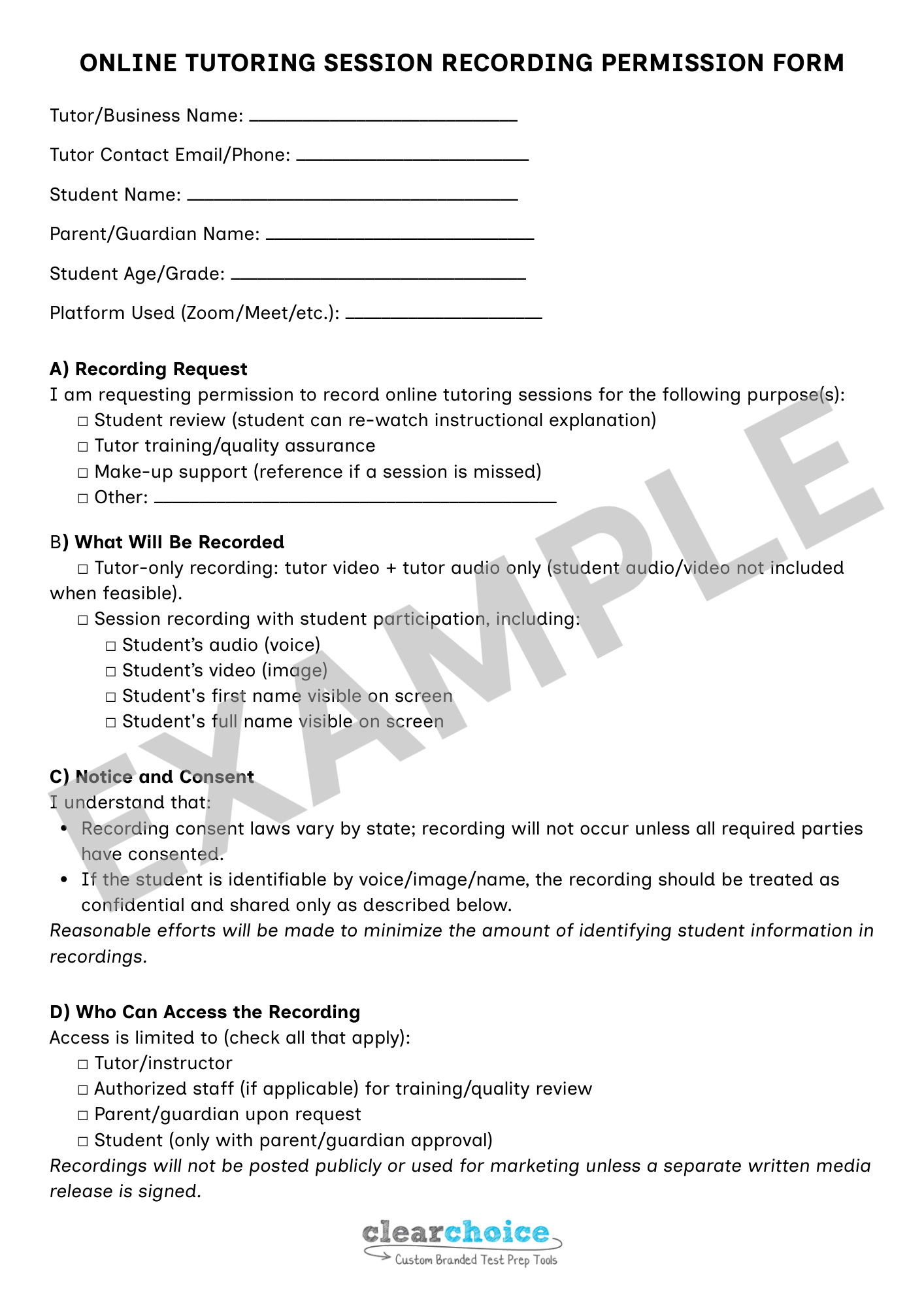
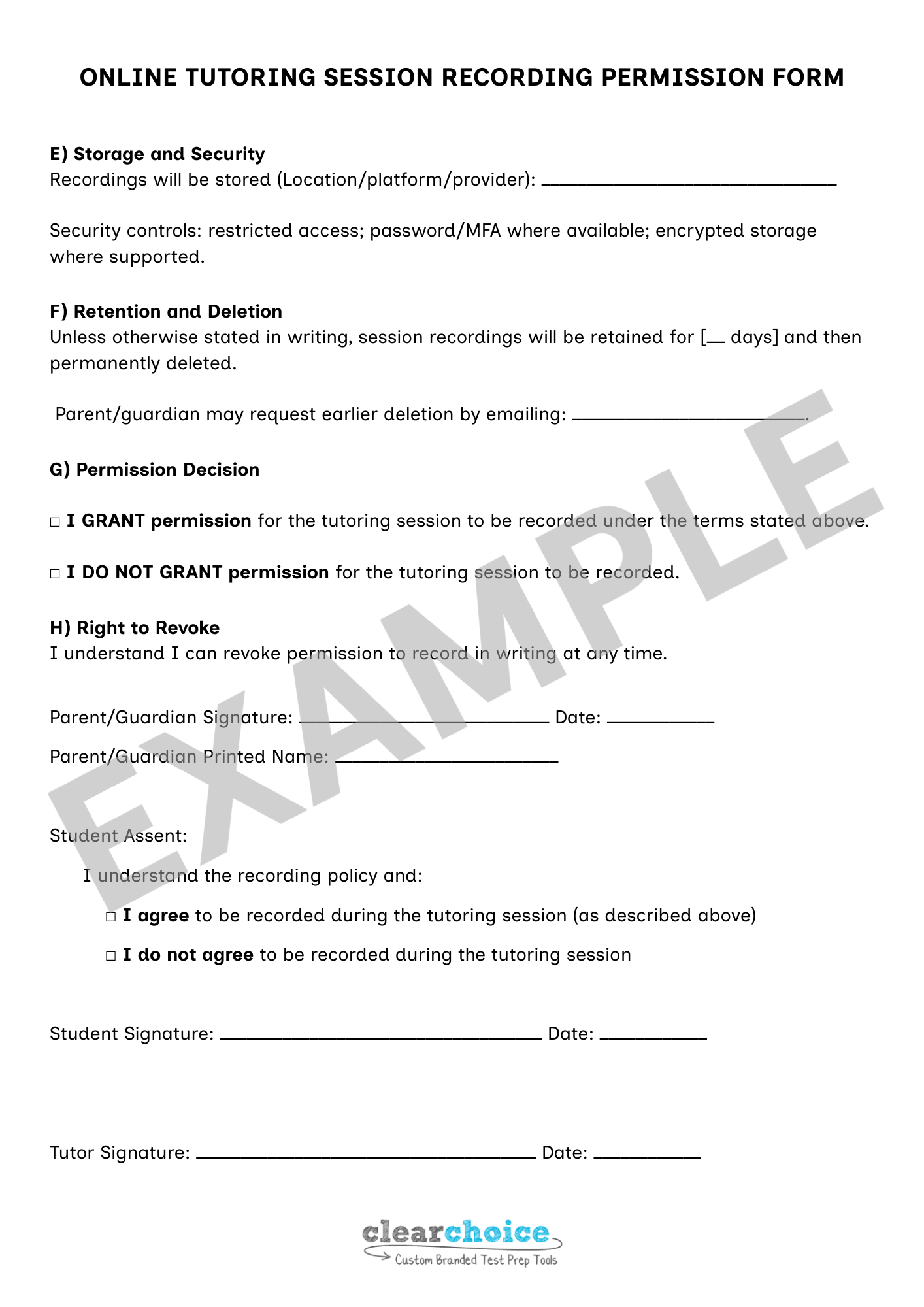
Online Tutoring Session Recording Permission Form
Here is a sample permission form. You must have a written permission request form to record any session, whether it is a tutor-only recording with a client or otherwise.
Keep Online Sessions Secure
Your online tutoring policy should include a basic security standard so:
only the approved client(s) can enter the session, and
the link doesn’t get forwarded or reused.
Follow Basic Security Standards
Use a waiting room or passcode for every session.
Send the link directly to the parent/guardian.
Limit screen sharing to what’s necessary (host-only is a good default).
Lock the meeting once the student is present, when the platform allows it.
Have a disruption plan: remove unknown participants immediately and end the session if you can’t confirm who is present.
What to Do When a Boundary Gets Crossed
Security rules protect access to the session, but what happens if a client crosses a boundary?
The most important thing is that you don’t freeze or panic in the moment. Having a script ready for any possible issues will help you remain calm, use consistent language, and be professional.
Here are some examples of crossed boundaries and how to handle them:
1. Student joins from a bedroom / lying in bed
Your response: “Quick reset: our sessions need to be in a shared space, and you need to be seated upright. Please move to a common area, and I’ll wait.”
2. Someone off-camera is clearly in the room, but you’re not sure who it is
Your response: “ I need to confirm who’s present during our session. If someone is listening in, that’s totally fine—but I need to know who it is.”
3. A parent wants a private side conversation mid-session
Your response: “Happy to talk—please email me, and I’ll respond there, or we can schedule a quick check-in after session time.”
4. Session feels too casual (e.g., snacking, multitasking, walking around)
Your response: “I want this to be a productive time, and to do so, we need to stay focused. Let’s pause until you’re settled and ready to focus.”
5. You suspect the session is being recorded without your permission
Your response: “I don’t allow recording unless it’s been approved in writing ahead of time. Are you recording right now?
If the answer is yes or you’re still unsure: “Please stop recording. If you would like a recording of this session, we can pause so I can send the consent form, and we can do this the right way.”
Policy Language for Onboarding Online Tutoring Sessions
If you want these expectations to stick, put them in writing (welcome email, policies page, or intake doc). Here’s a version you can adapt:
Online Tutoring Policy
To maintain a professional, safe, and consistent tutoring environment, all online sessions must be conducted in a public setting or a shared/common space of the home. A parent/guardian should be home and available during every session. A parent/guardian may be asked to do a quick check-in at the start of every session to confirm their presence and the student’s setup.Every online tutoring session uses a secure meeting link (waiting room/passcode). Sessions are not recorded unless written permission is provided in advance by all required parties. If the online tutoring session setup does not meet these expectations, the session will pause until it is corrected (or will be rescheduled).
Having an online tutoring policy in place at the start of your tutor-client relationship is essential. It outlines your expectations, reinforces that tutoring is a professional service, and creates clear accountability on both sides.
You don’t need a long list of rules to run successful online tutoring sessions. You need a solid policy with a few clear rules you actually enforce.
Once those boundaries are in place, you’ll find your students settle into their sessions faster, parents know what to expect, and you spend less time managing logistics and more time teaching.
At Clear Choice, we build tutor-ready systems for test-prep tutors designed to make tutoring easier to run day to day. Interested?
Helpful Resources
University of Michigan: Recording Class Activities: (Some) Rules of the Road
Drexel University: Frequently Asked Questions: Recording Classes Under FERPA and PA Law
Carnegie Mellon University: Boundaries when Working with Minors
University of Southern California: Guidelines for Interacting with Minors
University of Washington: Guidance for technology based youth activities
UW–Madison: Youth Protection Policy
Johns Hopkins: Securing Your Zoom Meetings
Federal Trade Commission: Stay safe while video conferencing
U.S. Dept. of Education (SPPO): FAQs on Photos and Videos under FERPA
U.S. Dept. of Education (SPPO): Protecting Student Privacy While Using Online Educational Services: Requirements and Best Practices
U.S. Dept. of Education (SPPO): FERPA and Virtual Learning
SUNY Cortland: FERPA and Virtual Classrooms