
Digital SAT® Score Report Review: How to Interpret Test Results Without QAS/SAS
The Problem:
Your client gets their digital SAT® score back, and you’re ready to review the results and build a new plan. Then you hit a major snag: you can’t review the real test questions.
How do you figure out which question types tripped them up, and what needs to be worked on to boost that score? Not having access to the QAS/SAS anymore is frustrating—not because you need to see every question to help your student improve, but because it changes how you conduct the post-test score review and plan for next steps.
Before we dive in, let’s get a few things straight.
The College Board does not offer QAS or SAS for the digital SAT®. Question-and-Answer Service (QAS) and Student Answer Service (SAS) are not available for the digital SAT®. If your clients are expecting a question-by-question “here’s exactly what you missed” review from the official exam, it’s not coming.
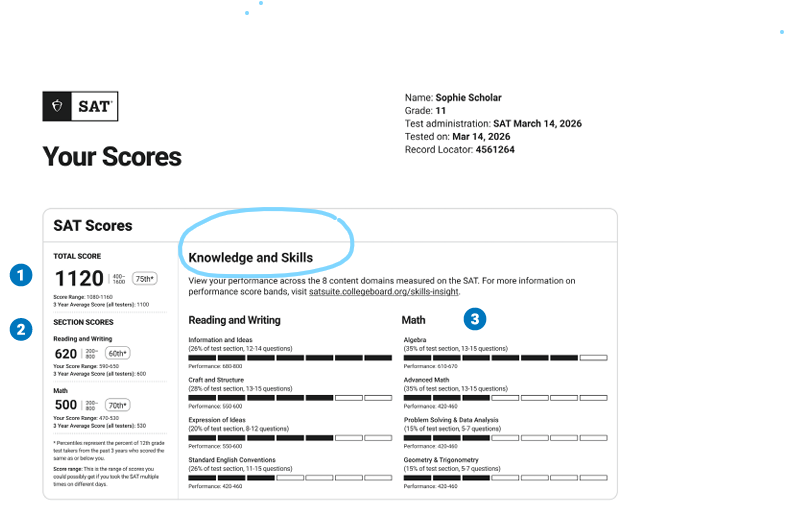
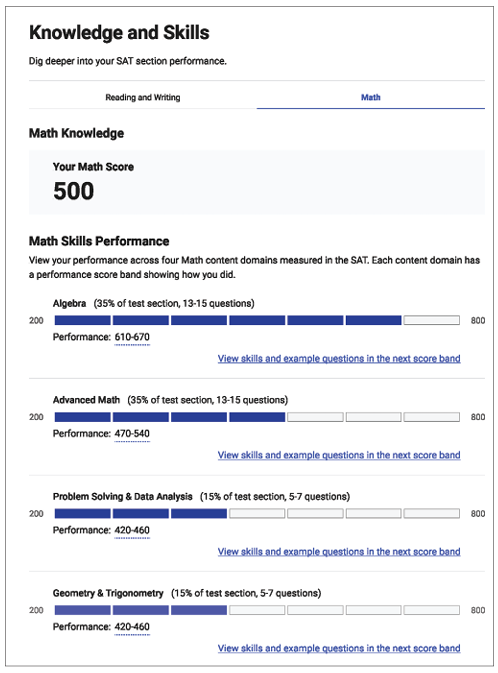
The score report still gives you enough information to properly review their performance, especially the Knowledge and Skills section that shows performance across 8 content areas (4 Reading and Writing, 4 Math).
The goal isn’t to explain the score. The goal is to pinpoint the student’s weak areas and choose the next instructional priorities.
A post-test review should be built around the score report plus practice-test evidence.
The Simple Solution:
The score report won’t tell you exactly what the student missed. It will tell you where to start.
The College Board’s score report includes a Knowledge and Skills section that breaks results into eight content areas. For each area, you can see the approximate number of questions and the percentage of the section.
That’s enough information to answer:
“Is Reading and Writing or Math driving this score?”
“Where are the knowledge gaps?”
“What’s the best section to focus on next?”
There is not enough information to answer:
“What exactly did the student get wrong on the real test?”
“Which question types did they struggle with?”
Use the score report to choose what to prioritize next, then use practice tests to pinpoint the specific question types your student is struggling with.
Reviewing Digital SAT® Score Reports Without QAS/SAS
A Digital SAT® score report isn’t enough to build a full prep plan by itself. It is enough to identify the biggest priority and decide what to work on next.
Start with Two Checks:
1) Compare Reading and Writing vs. Math: Which section has a lower score, and by how much? This determines whether prep should focus mainly on one area or be split across both.
2) Review Knowledge and Skills: The Knowledge and Skills section breaks the test results into 8 content areas. For each area, it shows the approximate number of questions and the percentage of the section covered by that area.
The goal at this stage is to find the one content area that needs attention first.
Next steps: Post-Test Review
The next step is developing a consistent structure that can be adjusted based on the student’s goal, timeline, and score history.
Step 1: Ask how test day went.
A few questions help separate content issues from test-day issues:
Did anything affect performance (sleep, anxiety, pacing, distractions, tech problems)?
Did one module feel noticeably harder than the other?
This isn’t about making excuses. It’s about avoiding the wrong conclusion. If test day issues were a bigger factor than content, that matters before treating the score as a definitive measure of knowledge.
Step 2: Choose one priority.
Choose one priority to focus on next. The Knowledge and Skills section helps pinpoint the best place to start by showing the eight content areas in one place.
If a student leaves the session with too many priorities, they won’t know what to do first. A plan with one priority makes it easier to start.
Step 3: Decide what to work on next.
This is where the Digital SAT® review works differently than before.
Because QAS and SAS aren’t available for the Digital SAT®, the official score report does not provide a question-by-question review from test day. The score report can help set priorities, but practice tests are still needed to pinpoint the specific question types causing the problems.
Use a diagnostic practice test to:
Confirm whether this is a knowledge gap or a strategy issue.
Identify which question types are causing the student the most trouble.
Determine whether wrong answers are mainly due to pacing or content.
Score Verification: what it is and what it isn’t
The College Board offers SAT® Score Verification, but it is not a substitute for QAS/SAS, and it does not provide a question review. It’s a separate process used to double-check scoring.
Score verification is performed only once per test, upon request. The deadline is 5 months after test day. To request score verification, students must order by phone through College Board Customer Service (see the SAT® Score Verification page for more information and contact details).
Build a system you can reuse—and put your name on it
The Digital SAT® doesn’t give question-by-question review from the official test, so post-test score review needs a structure you can depend on and repeat.
If you want that process to be consistent across students (and across tutors!), Clear Choice can help. Our SAT®/ACT® system includes lessons, quizzes, answer sheets, score reports, and email progress reports, plus custom-branded workbooks—so your materials match your business, not someone else’s! If you’d like a free demo to see how it works, getting started is as easy as clicking here!