
Buyer's Guide: Best Calculators for the ACT®, Digital SAT®, and College
A calculator is one of the few test-prep purchases that can actually double as a long-term academic tool—if the student buys the right one.
The problem is that “the right one” isn’t obvious anymore. The digital SAT® has a built-in calculator (Desmos), the ACT® expects students to bring their own, and one wrong click online can land you with a CAS (i.e., Computer Algebra Systems) model that isn’t allowed for either the ACT® or the SAT® on test day.
In this buyer’s guide, I’ll break down what the ACT® and digital SAT® allow (and ban), explain the biggest shopping mistakes to avoid, and share the best calculator picks for students who need something that works for test prep, test day, high school math, and many college courses.
Quick Buying Takeaways
If a student is taking the ACT®, I recommend owning a handheld calculator that they practice with regularly. (Note: ACT® is bring-your-own calculator.)
If a student is taking the digital SAT®, the built-in Desmos calculator is available for Math, so a handheld calculator is optional—but some students still prefer to use one they know well. (College Board explains the options.)
The #1 most expensive mistake: buying a calculator with CAS in the name. Both testing policies prohibit CAS.
Buying the Right Calculator
Choosing a calculator is less about getting the “best” model and more about making a smart purchase that will still be useful and reliable after high school.
The steps below are to help your clients do exactly that: narrow down the right calculator type, avoid costly “not allowed” mistakes (e.g., CAS), and pick a model that fits the student’s testing plans and academic path—now and through college.
Step 1: Choose the Right Calculator Type
When a student (or parent) asks, “What calculator should I buy?”, tell them to start here:
Choice A: “Buy once” coverage. For this type, the best choice is a non-CAS graphing calculator. This is usually the most future-proof option for students taking Algebra 2 / Precalc / AP math and/or the ACT®.
Choice B: SAT®-focused + cost-conscious. Your best choice is to buy a reliable scientific calculator as a backup choice for the digital SAT®, math class, and any non-SAT® tests.
Choice C: College STEM readiness. For this choice, your best bet is a strong scientific calculator. In many college STEM courses, professors restrict calculator types on exams, and scientific calculators are often considered the “safe” option.
Note: A graphing calculator can still be useful for learning and visualizing, but it may not be allowed on every college exam.
Step 2: The Policy Rules That Actually Affect What a Student Should Buy
I’m not going to restate every line of each testing policy here (see links below for details), but I am going to highlight what matters when shopping for a calculator.
Digital SAT® (from the SAT® calculator policy)
A student can use the built-in calculator in Bluebook (and switch between scientific and graphing modes), or bring an approved handheld.
Non-CAS only.
Students can’t use calculators with prohibited features (see details here), such as programs that have algebra functionality.
Acceptable SAT® Calculator Types:
The Desmos calculator is embedded in the Bluebook testing app
Graphing calculators that do not include CAS features
Scientific calculators
4-function basic calculators
Note: For SAT®, the best handheld calculator is mostly about comfort and consistency—because the built-in Desmos option is already really strong.
ACT® (from the ACT® calculator policy)
A student may use a 4-function, scientific, or graphing calculator (unless it’s prohibited—see details here).
ACT® lists restrictions and modifications (e.g., sound off, no paper tape, cover infrared ports if applicable, and remove prohibited functionality where relevant), so test takers must be aware of those before bringing their calculator of choice on test day.
Acceptable ACT® Calculator Types:
Graphing calculators that do not include CAS features
Scientific calculators
4-function basic calculators
Note: For ACT®, a handheld calculator matters more because students are expected to bring their own and rely on one under time pressure.
Step 3: Avoid the Expensive Mistake (of buying a CAS)
A simple shopping rule: If “CAS” is in the calculator name, don’t buy it.
Both testing policies prohibit CAS calculators, and both provide examples of prohibited models and device types.
Common prohibited calculators (from the official testing policies):
Texas Instruments: TI-89 / TI-92 families; TI-Nspire CAS models (non-CAS TI-Nspire models are treated differently by policy—the main issue is any model with “CAS”).
HP: HP Prime; HP 48GII; and other listed families in the policy.
Casio: ClassPad families and other listed CAS families.
Other common calculator features that are banned from testing:
QWERTY keyboards,
connectivity/communication features,
calculators built into phones/devices, and
anything that crosses into prohibited computing.
When in doubt, advise your students to confirm their exact calculator model and features against the official calculator list—ideally, before they buy it, not the week of the test.
Best Calculator Picks
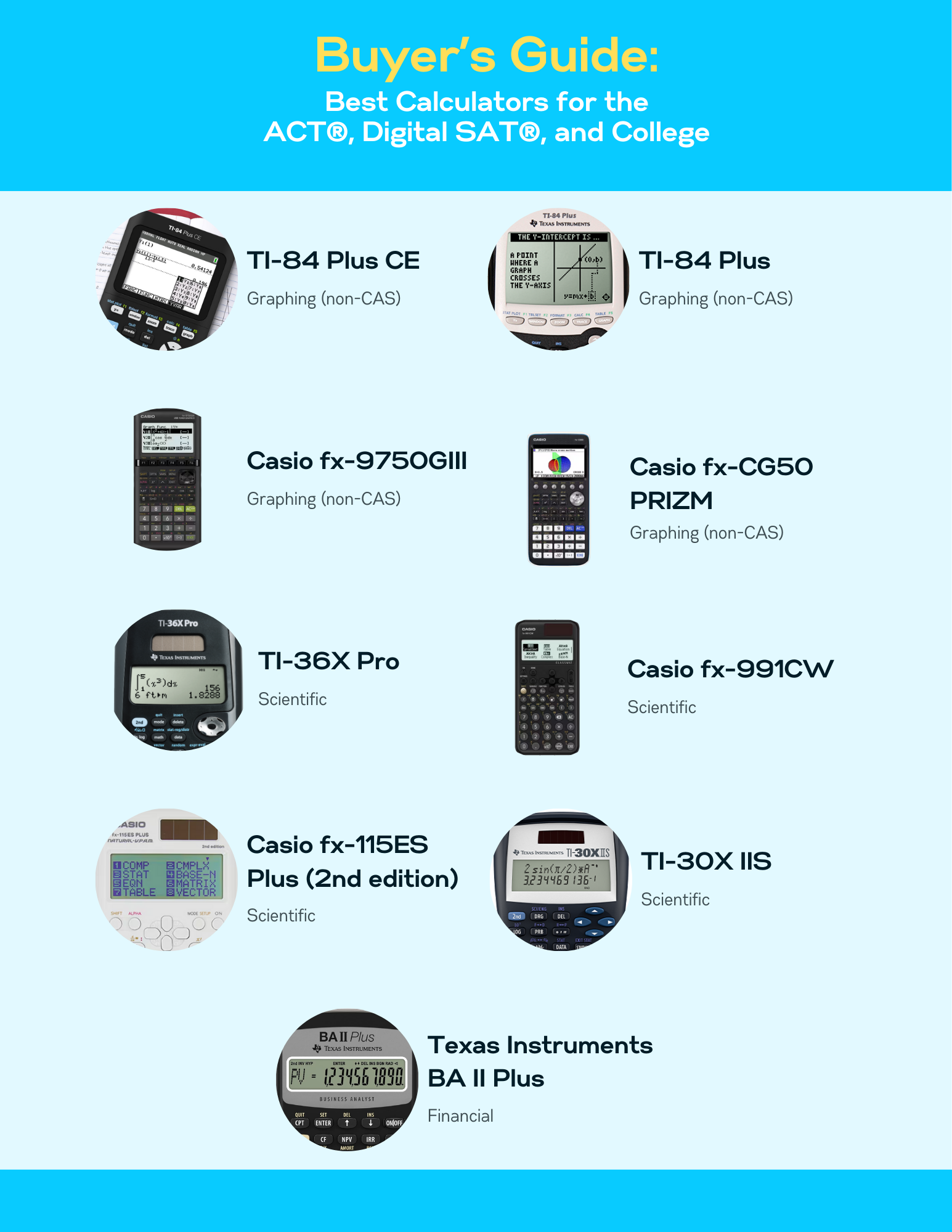
I’m not here to sell products, so I’m not linking anything—just listing specific models and why they’re worth considering as a long-term purchase.
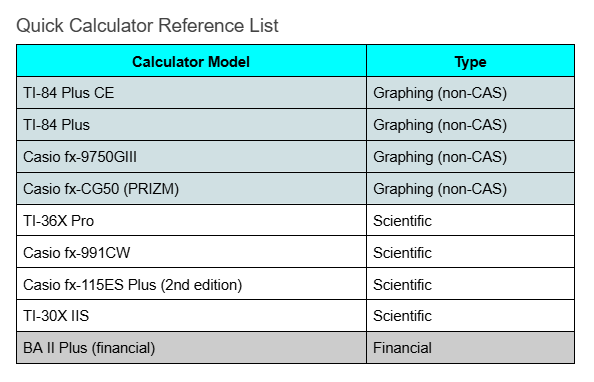
Best Graphing Calculators (Non-CAS)
A non-CAS graphing calculator gives students strong, long-term coverage for high school math, the ACT®, many college math courses, and (optionally) the SAT® as a handheld tool.
#1: TI-84 Plus CE
Type: Graphing (non-CAS)
Best for: ACT® takers; Algebra 2/Precalc/AP coursework; students who want to only buy one long-term device for high school, testing, and college courses.
Why it’s a smart long-term buy:
Familiar to many schools/tutors, so support is easy to find
Graphing tools are useful for most math courses, not just on test day
#2: TI-84 Plu
Type: Graphing (non-CAS)
Best for: Students who want a classic graphing calculator
Why it’s a smart long-term buy:
Very common; consistent interface
Great “practice continuity” calculator (since what they practice should be what they use on ACT® day)
#3: Casio fx-9750GIII
Type: Graphing (non-CAS)
Best for: Students who want a capable graphing calculator without defaulting to TI
Why it’s a smart long-term buy:
Solid graphing functionality for high school math
Good choice for students who learn quickly and want to stick to one device
#4: Casio fx-CG50 (PRIZM)
Type: Graphing (non-CAS)
Best for: Students who benefit from stronger visualization tools
Why it’s a smart long-term buy: Strong graphing and visual learning tools
Best Scientific Calculators
Scientific-type calculators are often the most useful and widely allowed type in college testing environments.
#5: TI-36X Pro
Type: Scientific
Best for: STEM; a strong choice for the ACT® or digital SAT® backup calculator
Why it’s a smart long-term buy:
Capable enough for many college math/science courses
Practical for situations where graphing calculators are restricted or prohibited
#6: Casio fx-991CW
Type: Scientific
Best for: Students who want strong scientific functionality for high school and college
Why it’s a smart long-term buy: Excellent choice for everyday coursework and test prep
#7: Casio fx-115ES Plus (2nd edition)
Type: Scientific
Best for: General high school and college readiness
Why it’s a smart long-term buy: Common, reliable, and easy to find support
#8: TI-30X IIS
Type: Scientific (entry-level)
Best for: Budget-conscious students who need a simple, dependable option
Why it’s a smart long-term buy: Straightforward; widely accepted in classrooms
Best for Business/Finance Pathway
#9: BA II Plus (financial)
Type: Financial
Best for: Students very likely to pursue business/finance coursework later
Why it’s a smart long-term buy: Some college programs explicitly require a financial calculator
Test Day Calculator Check
Ideally, your clients have been practicing their test prep using an acceptable and reliable calculator type that is serving them well in school and will support them on test day.
To make sure, remind them to follow this checklist before test day:
Confirm the calculator is non-CAS (again: “CAS” in the name is the red flag).
Turn the sound off.
Remove stored documents/programs if the policy requires it for their calculator type.
Cover infrared ports if applicable.
Bring fresh batteries/charging plan—and if possible, a backup calculator.
If they’re not sure if they have the right calculator for the test, they need to check the testing policies:
The best test day advantage is practicing with the exact calculator they’ll use on test day.
Finding the right calculator can lead to overthinking: too many models, too many opinions, too many “upgrade” options that don’t actually help.
Keep it simple. Advise your clients to buy a calculator that’s test-acceptable, easy to practice with, and useful beyond test day.